

How it works
 Know When I Go
Secure, simple, ready when needed
Planning ahead doesn't need to be overwhelming. Know When I Go makes it simple to organise key life details - so your loved ones aren't left guessing. In just a few steps, you'll create a secure account and start building peace of mind that lasts.
Your privacy is absolute. Everything you enter is encrypted - we cannot see your personal information, wishes, or messages. The only details we ever have access to are your email address and username. Your data is yours alone.
Below are the various categories we've created to help you capture all the information you'd like to pass on. The layout is similar to the dashboard you'll see once you have registered and chosen your plan option. To add your information, simply click on any category and follow the prompts – there's guidance and suggested content for each category. You choose the amount of detail you wish to record.
Example dashboard:
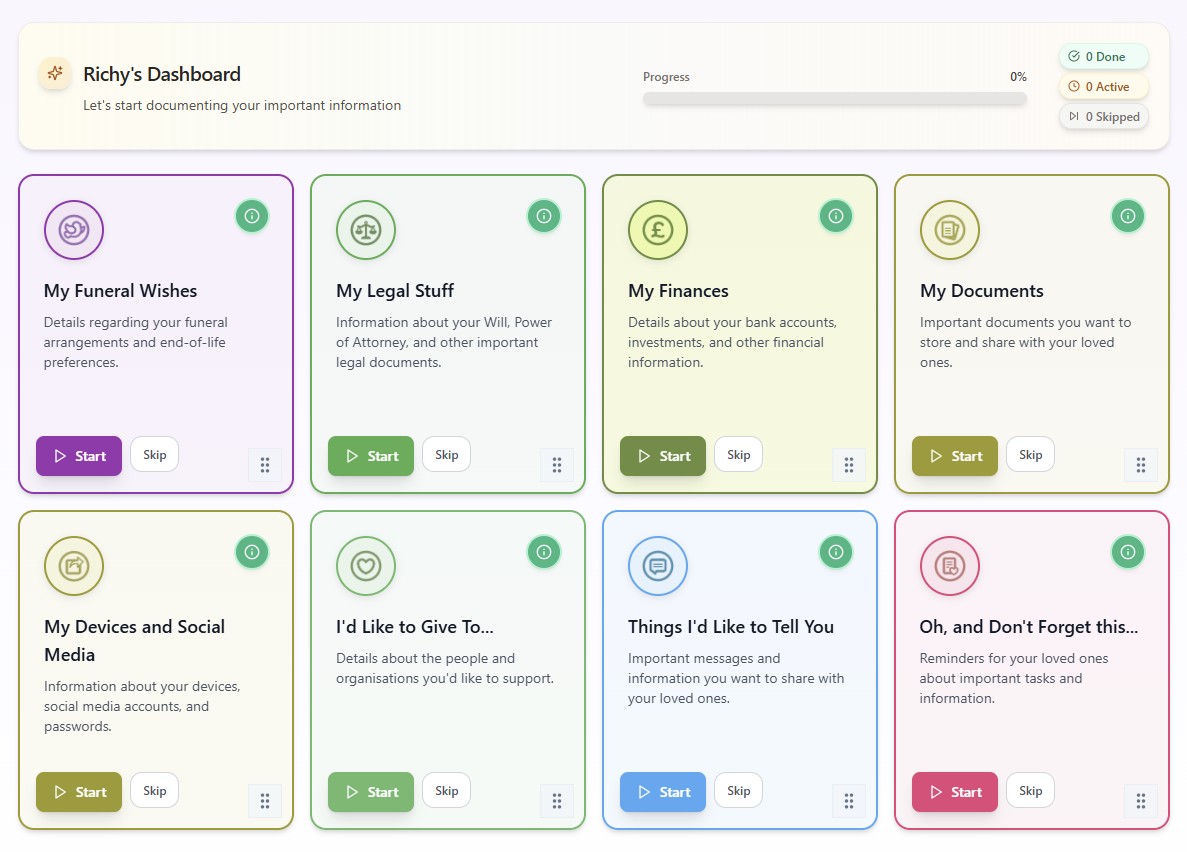
When you are content that you have added all the information you want for each category, you can then download what will be a collated, easy-to-follow pdf to your own device - where it can be stored for you to subsequently share or print off.
Don't worry if you realise that you have left something off - or you want to add, change or delete anything within a category - as you can do that at any time within 30 days if you chose the One-Time Setup option, or at any time within the year if you chose the Always-On-File annual subscription option.
What are the plan options open to me?
Know When I Go offers two options:
Always-On-File Annual Subscription Option (£9.99 setup + £2.99 first year, then £5.99/year)
The 'always on file' option for those who want their notes to stay accessible and updateable over time. From practical handovers to everyday instructions, it's a low-cost way to make sure the right details are always available - ready to guide, reassure, and reduce guesswork when it matters most. The special £2.99 introductory rate applies to your first year only.
One-Time Setup Option (£9.99, held for 30 days)
A focused option for capturing key instructions and handover notes - stored securely for 30 days, then cleared. Ideal for those who want to document what matters without ongoing storage. One entry, one fee, no renewal. Just the facts, ready to pass on. You can upgrade to Always-On-File within your 30-day window, though the annual renewal will be at £5.99/year as the introductory £2.99 rate is only available when choosing Always-On-File at the outset.
Ready to proceed? Here's how to do it...
Step 1
Create your account
- •Click on any of the 'Create account' buttons anywhere on the website.
- •Enter your name, email address, and choose a secure password.
- •Your password must be at least eight characters and include:
- •Upper and lowercase letters
- •At least one number
Step 2
Select your plan & pay
- •Now select your plan.
- •After you have done that, click the 'Create account' button.
- •You will then be directed to the secure payment area.
- •Enter your payment details then press the 'Pay and subscribe' button.
Step 3
Access your dashboard
- •And that's you - you will now have access to your dashboard.
- •Click the 'Sign in' button at the top right-hand corner of the Home Page to access your account at any time.